1
Answer a few questions
Tell us your destination, dates, group, budget and what matters: kids, live music, mobility needs, food or nightlife.
Answer a few questions: who's coming, how much walking is okay, traveling with a baby, into concerts and nightlife? Then Tapinerary builds your complete day-by-day itinerary.
Works on iPhone (Safari) and Android (Chrome) · Free to try · Use it offline
Tapinerary plans around real people, not generic tourist lists. Your dates, pace, budget and priorities shape every stop. Any AI can write you a travel essay; Tapinerary builds a trip you can actually follow.
Tell us your destination, dates, group, budget and what matters: kids, live music, mobility needs, food or nightlife.
Get a day-by-day itinerary with realistic timing, prices, maps and honest tips matched to your answers.
Not quite right? Tell the AI what to change and it reworks the plan. Then open each stop in maps, add notes and your own places, and tick things done as you travel, even offline.
Straight screenshots from the app, no mockups: a first-time Rome weekend from question to plan.

The full journey in 44 seconds: type where, answer a few taps, watch it build, then flip through every generated day with its live weather, the prep checklist with booking deadlines, the budget, a tick, the tweak tools with the one-tap Running late rescue, and Lucky's expert review. This loop is the real app, recorded as-is.
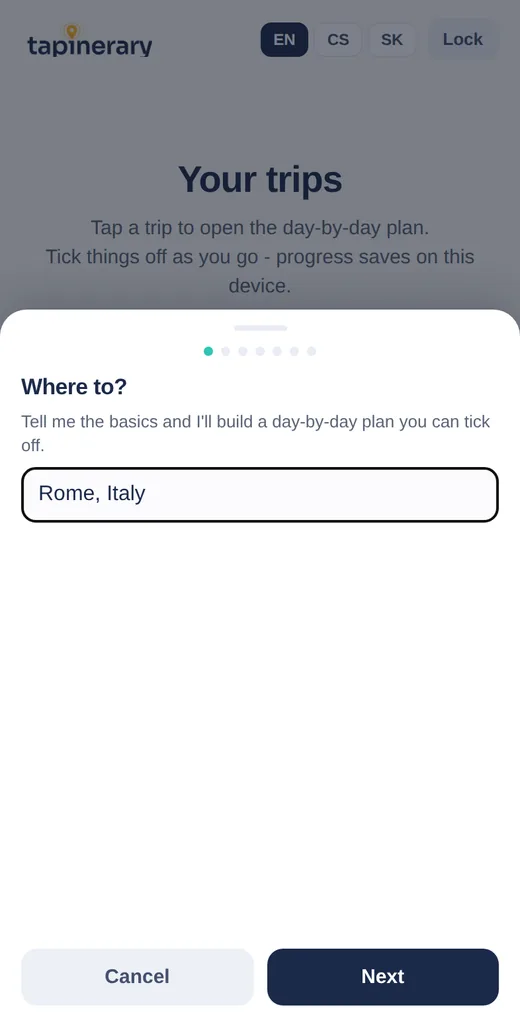
A few taps: where, when, who's coming, your pace.

Lucky narrates while real stops stream in, with fun facts about your destination. Lock your phone, it finishes alone.
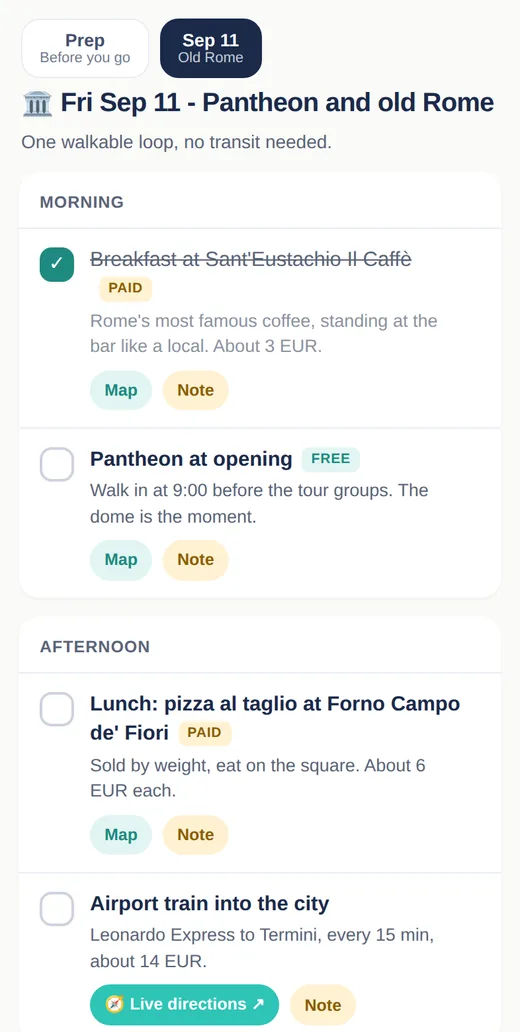
Real named places with honest prices, one-tap maps, and live transit directions for today's actual departures.
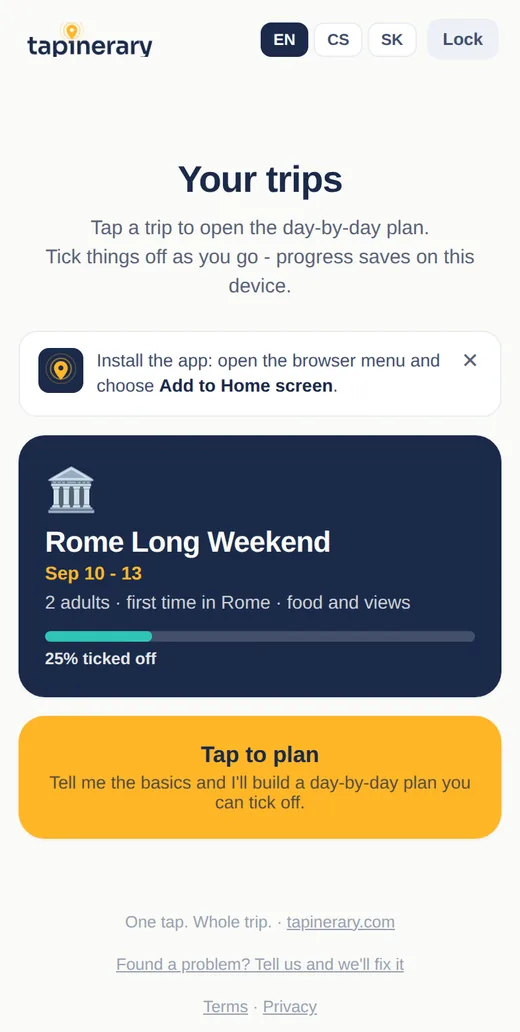
Everyone with the passphrase sees the same trip; ticks and notes sync for the whole crew, offline included.
Choose a passphrase when you open Tapinerary. That phrase becomes your private travel space and syncs your trips anywhere you enter it.
Share the passphrase with your travel crew and everyone sees the same trip. A different passphrase opens a different, empty space.
No app store needed, and it works on both iPhone and Android. On iPhone use Safari; on Android use Chrome. Install it once and it opens full-screen from your home screen.
Open tapinerary.com in Safari (installing only works from Safari on iPhone).
Tap the Share button (the square with an arrow at the bottom).
Scroll down and tap Add to Home Screen.
Tap Add. The Tapinerary icon appears on your home screen.

Every space gets 3 AI-planned trips a month, and everything else, ticking, notes, maps, sharing, translating, is unlimited. Paid packs for heavy planners come later; trips you have already made stay yours. The best way to support us right now: use it, share it, and tell us what to improve.
✉️ Send us feedbackEvery report gets read by a human. Usually the same day.
You can, and it is great for ideas. Tapinerary is built for what happens after the conversation: your plan becomes a real trip on your phone that works offline, syncs with your group, shows live weather and today's transit for each day, and keeps your progress when you tick things off or ask for changes. A chat answer stays in the chat; a Tapinerary trip travels with you.
Give them your passphrase. Everyone who enters the same passphrase sees the same trips, and when anyone ticks something off or adds a note, it updates for the whole group. Tip: use a fresh passphrase for each crew (three random words work great, like velvet harbor sunrise 26) so your other trips stay private.
It cannot be recovered, by anyone. That is the tradeoff for having no accounts and no emails: the passphrase is the only key to your space. Write it down somewhere safe, or save it in your password manager. When the app suggests a passphrase for you, a Tap to copy chip appears so you can copy it and store it in one gesture. If it is gone, start a new space with a new passphrase.
Usually one to two minutes. You do not have to watch it: lock your phone, switch apps, whatever. The trip finishes on its own and will be waiting on your trips screen. While you wait, we show fun facts about your destination.
Yes, Tapinerary is free while in beta. Each space gets 3 AI-generated trips per month, and the allowance resets on the 1st. Everything else, ticking, notes, adding places, editing, translating and sharing, is unlimited. Later, heavy planners will be able to buy a small pack of extra trips; trips you have already made always stay free.
Yes, several ways. Tick off stops as you go, add a note to any item (like "booked for 8 PM"), and add your own places to any day with real place search. You can also tap Tweak this trip to tell the AI what to change ("day 2 is too packed, swap the museum for something outdoors") and it reworks the plan while keeping everything you have already ticked. Every stop opens in your maps app with one tap.
Yes. When you create a space you can add an optional PIN. Then opening the space needs both the passphrase and the PIN, so even someone who guessed a simple passphrase could not get in. Like the passphrase, a lost PIN cannot be recovered, so save it somewhere safe. Most people are fine with just a strong passphrase; the PIN is there if you want a belt-and-braces second lock.
Open your trips screen and tap Delete this space at the bottom. It permanently erases every trip, tick, and note in that space, from our database and from your device, instantly. Since we never store your name or email, there is nothing else to delete.
No. Tapinerary installs straight from the browser: Safari on iPhone (Share, then Add to Home Screen) or Chrome on Android (menu, then Install app). It opens full screen from its own icon.
Yes. Once you have opened a trip on a device, it works fully offline: the app opens without logging in again, shows your plan, and lets you tick things off. Your ticks sync back to the rest of your crew the moment you are back online. You only need a connection to generate, tweak or translate a trip, and to open map links.
Yes. While the AI plans, the screen shows the plan taking shape live, stop by stop, over a photo of your destination, with Lucky (our mascot) narrating what is happening and fun facts about where you are going. You can also just lock your phone; the trip finishes on its own.
Every getting-around step has a Live directions button that opens the route in Google Maps transit, so you always get today's real line numbers and departure times instead of stale printed ones. Individual places open in your native maps app: Apple Maps on iPhone, Google Maps elsewhere.
An optional extra: Lucky re-reads your whole generated plan like a picky local guide, swaps generic filler for real named places, fixes overpacked or thin days, and then shows you a short list of exactly what changed. Your ticks and notes stay attached. It is free while we are in beta and will later become a small paid extra.
The app runs in English, Czech, and Slovak (switchable any time), and new itineraries are written in the language you are using. Already made a trip in another language? Open it and tap Translate at the top to convert the whole plan, keeping your ticks and notes.
Tell Tapinerary how you actually travel and get a plan built around you.
Open the app